

R Implementation Notes
Docker
Section titled “Docker”We recommend using the Rocker version-stable images. The R base image does not keep older R versions, so the upgrades are not under your control. If you want to use the same environment as in transformations, use our image.
Working with CSV Files
Section titled “Working with CSV Files”We recommend that you follow the guidelines for the R transformation. The standard R functions for CSV files work without problems:
data <- read.csv(file = "in/tables/source.csv");
df <- data.frame(  col1 = paste0(data$first, 'ping'),  col2 = data$second * 42)write.csv(df, file = "out/tables/result.csv", row.names = FALSE)
You can also use the write_csv function from the readr packages. It is faster.
Using Keboola Package
Section titled “Using Keboola Package”Keboola’s R component package provides functions to
- read and parse the configuration file and parameters:
configDataproperty andgetParameters()method. - list input files and tables:
getInputFiles(),getInputTables()methods. - work with manifests containing table and file metadata:
getTableManifest(),getFileManifest(),writeTableManifest(),writeFileManifest()methods. - list expected outputs:
getExpectedOutputFiles()andgetExpectedOutputTables()methods.
The library is a standard R package that is available by default in the production environment.
Ready for use on GitHub, it can be installed locally with devtools::install_github('keboola/r-docker-application', ref = 'master').
Use the library to read a user-supplied configuration parameter ‘myParameter’:
library(keboola.r.docker.application)# initialize libraryapp <- keboola.r.docker.application::DockerApplication$new()app$readConfig()
# access the supplied value of 'myParameter'app$getParameters()$myParameter
The library contains a single RC class DockerApplication; the parameter of the constructor is the path to the data directory.
After that you can call readConfig() to actually read and parse the configuration file, and then read the myParameter parameter from the user-supplied configuration:
{ "myParameter": "myValue"}When the application is initialized app <- keboola.r.docker.application::DockerApplication$new(), it read the configuration file from the constructor
argument, if no argument is provided, the KBC_DATADIR environment variable is used.
You can obtain inline help and the list of library functions by running the ?DockerApplication command.
Dynamic Input/Output Mapping
Section titled “Dynamic Input/Output Mapping”In our tutorial, we show components which have names of their input/output tables hard-coded. The following example shows how to read the input and output mapping specified by the end user, which is accessible in the configuration file. It demonstrates how to read and write tables and table manifests. File manifests are handled the same way. For a full authoritative list of items returned in table list and manifest contents, see the specification.
Note that the destination label in the script refers to the destination from the
mapper perspective. The input mapper takes source tables
from the user’s storage and produces destination tables that become the input of the component. The output tables
of the component are consumed by the output mapper whose destination are the resulting tables in Storage.
# initialize libraryapp <- DockerApplication$new()app$readConfig()
# get list of input tablestables <- app$getInputTables()for (i in 1:nrow(tables)) {    # get csv file name    name <- tables[i, 'destination']
    # get csv full path and read table data    data <- read.csv(tables[i, 'full_path'])
    # read table metadata    manifest <- app$getTableManifest(name)    if ((length(manifest$primary_key) == 0) && (nrow(data) > 0)) {        # no primary key present, create one        data[['primary_key']] <- seq(1, nrow(data))    } else {        data[['primary_key']] <- NULL    }
    # do something clever    names(data) <- paste0('batman_', names(data))
    # get csv file name with full path from output mapping    outName <- app$getExpectedOutputTables()[i, 'full_path']    # get file name from output mapping    outDestination <- app$getExpectedOutputTables()[i, 'destination']
    # write output data    write.csv(data, file = outName, row.names = FALSE)
    # write table metadata - set new primary key    app$writeTableManifest(outName, destination = outDestination, primaryKey = c('batman_primary_key'))}
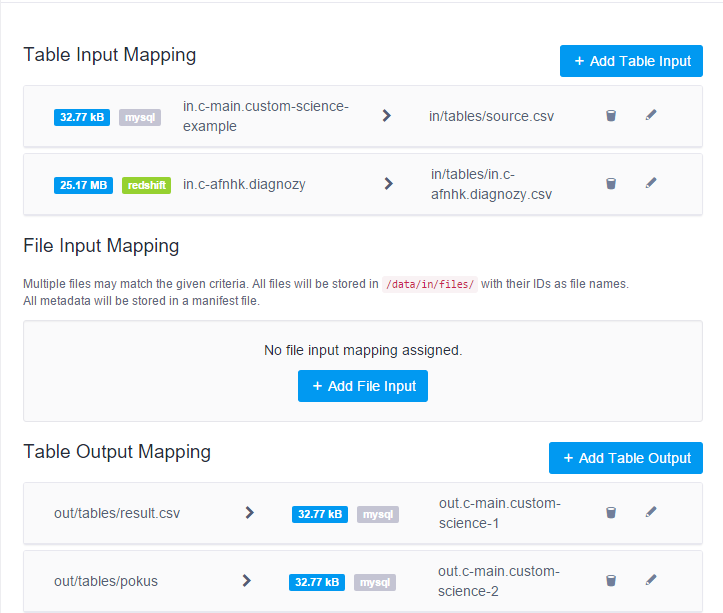
To test the code, set an arbitrary number of input/output mapping tables. Keep in mind to set the same number of inputs and outputs. The names of the CSV files are arbitrary.
Logging
Section titled “Logging”In R components, the outputs printed in rapid succession are sometimes joined into a single event; this is a known behavior of R and it has no workaround. See a dedicated article if you want to implement a GELF logger.